Help / Troubleshooting
An album shows twice, or only some of its tracks appear
The same record sits in Albums twice, its tracks split between the tiles. Or an album holds seven tracks when the folder holds twelve. Both are deliberate, and both are fixable.
The short answer
The album grid draws one tile per distinct pairing of the album tag and the Album Artist tag, so if a record's files disagree about either field you get two tiles.
Separately, three kinds of track are kept out of browsing on purpose: a duplicate copy that has a surviving keeper, a file that would not decode, and the single large file behind a CUE sheet. If some of an album's files fall into those, the album shows a short track list.
Nothing has been deleted either way, and every file is still on your disk.
Two tiles, one album
The album name disagrees. Much the commonest cause. One folder whose tracks carry different album tags fragments into a tile per value, and each tile then shows only a fraction of the folder. A stray trailing space, a "remastered" suffix on some tracks, or discs named "Album (Disc 1)" and "Album (Disc 2)" all read as different albums, because they are different text. Library Health counts those folders on the Album split across several names card, and the cure is the tag editor.
The album artist disagrees. Less common, and easier to repair. A few tracks carry the real artist, a few say "Various Artists", a few are blank, and each distinct value earns its own tile. Library Health counts it on the Split album artist card, scoped to the folder so same-titled albums by different artists stay separate. Review & fix sets one value across the release in a click, and where it cannot tell which is right it offers the values it found and lets you pick.
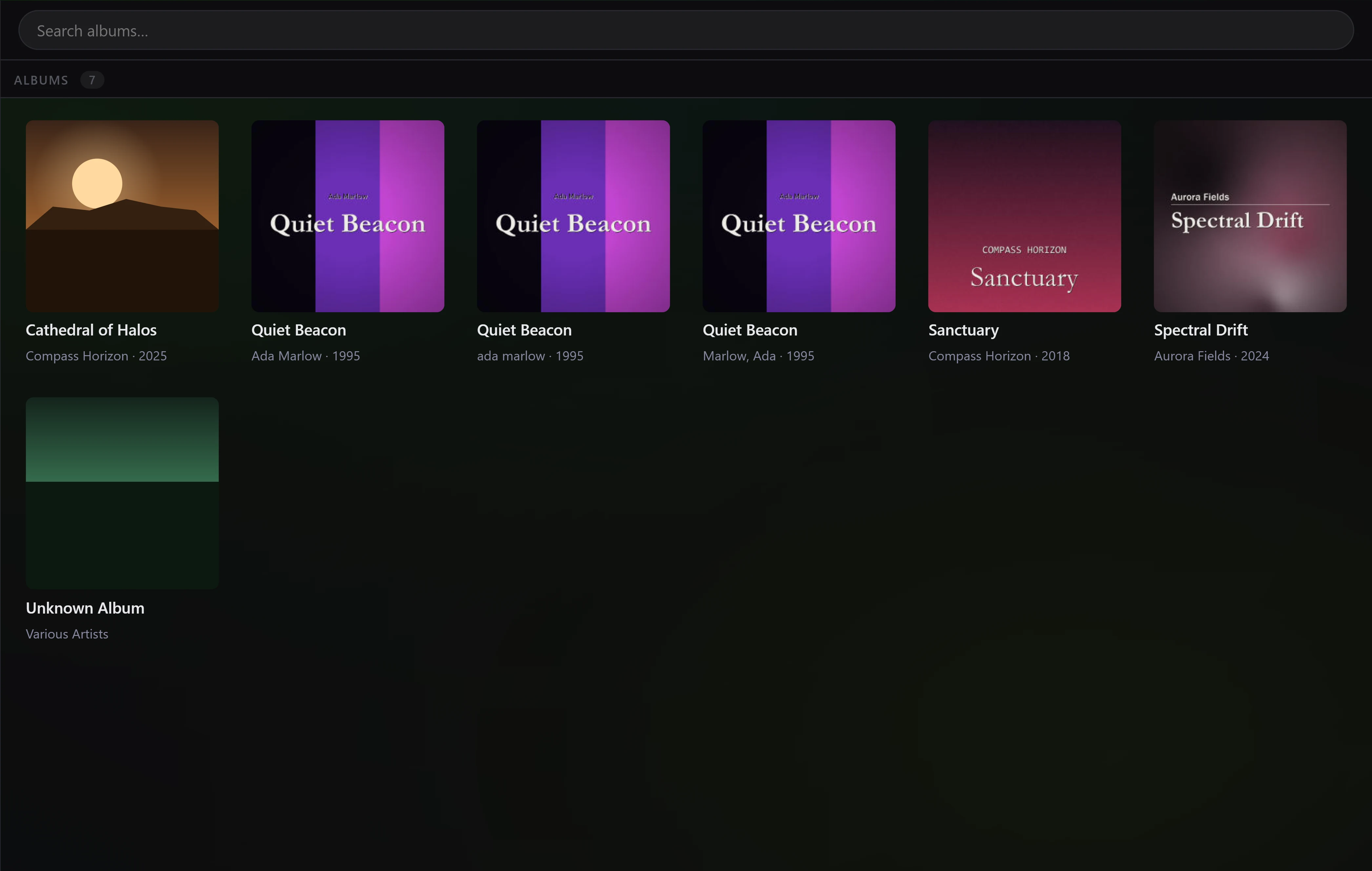
Two albums really do share a title. Plenty of records are called Greatest Hits, and those keep their own tiles on purpose. One quirk: the Recent from Local Tracks row on Home collapses tag-split tiles when it can prove they are one release; Albums does not.
Discs
Vesari Stylus reads a Disc # tag and shows per-disc headings inside an album whose tracks span more than one disc. A track with no disc number counts as disc 1, so a half-tagged album still groups sensibly. Both discs must share one album tag: set Disc # to 1 and 2 rather than naming the discs apart.
Running order is disc, then track number, then filename, so an album with no track numbers falls back to filename order rather than alphabetical by title.
Why only some tracks show
Duplicate copies are hidden. Every track gets a content identity: a MusicBrainz recording ID where it has one, then an acoustic fingerprint, then a composite of title, artist, album and duration, then the file path. Tracks sharing one are copies of the same recording. The app ranks each group by channel count, bit depth, sample rate, lossless format and file size, keeps the top copy, and flags the rest out of the track list and the Albums and Artists views.
The judgement is track by track, not album by album, and a flag only survives where the kept copy corroborates the hidden one: a length within a couple of seconds, and the same title. So where only some tracks of a second copy corroborate, only those are hidden, and the copy turns up as a partial album. Raw DTS and AC-3 bitstreams, DTS hidden inside a WAV, and files that failed to decode are never grouped as duplicates at all. Why do I see two different "duplicate" numbers? goes further.
Damaged files are hidden. The flag is set only for a readable file that opens and then reaches its end without producing a single frame of audio, so a missing FFmpeg or an unreachable drive gives you a message but never brands the file. If the image behind a CUE sheet fails, every track inside it is flagged, since the failure was proved on the file they share. A later successful fingerprint clears the flag, so a repaired or re-ripped file recovers the next time Super-Tag reaches it. See A track won't play or is flagged damaged.
The file behind a CUE sheet is hidden. Its music is already listed as the tracks the sheet describes, so showing the container too would add a second, untagged copy of the album as one long song. Remove the .cue and the next scan brings the file back. See CUE sheets.
What to do
- On the main library list, find the bar reading something like 88 duplicates + 3 damaged hidden and press Show. It is hidden inside an album, artist or genre view, so step back out first.
- Open Library Health. Start with Album split across several names, then Split album artist. View lists every track a card counted, hidden ones included; Review & fix applies the second card's repair.
- For a boxed set, give every disc the same album name and set Disc # per disc.
- Run Rescan Library from Tools so the grouping catches up.
If two tiles persist once every track agrees on both fields, or tracks stay hidden that are neither copies nor damaged, use Report a Bug in Settings. Is this a bug? How to report it explains what it sends.