Help / CD ripping
Rip settings: drive, secure or burst, and where files land
Every choice a rip depends on lives on one page, and it is not in Settings. Open Tools, pick the Vesari RipCore card, and there it all is: which drive, Secure or Burst, and which library folder the album goes into.
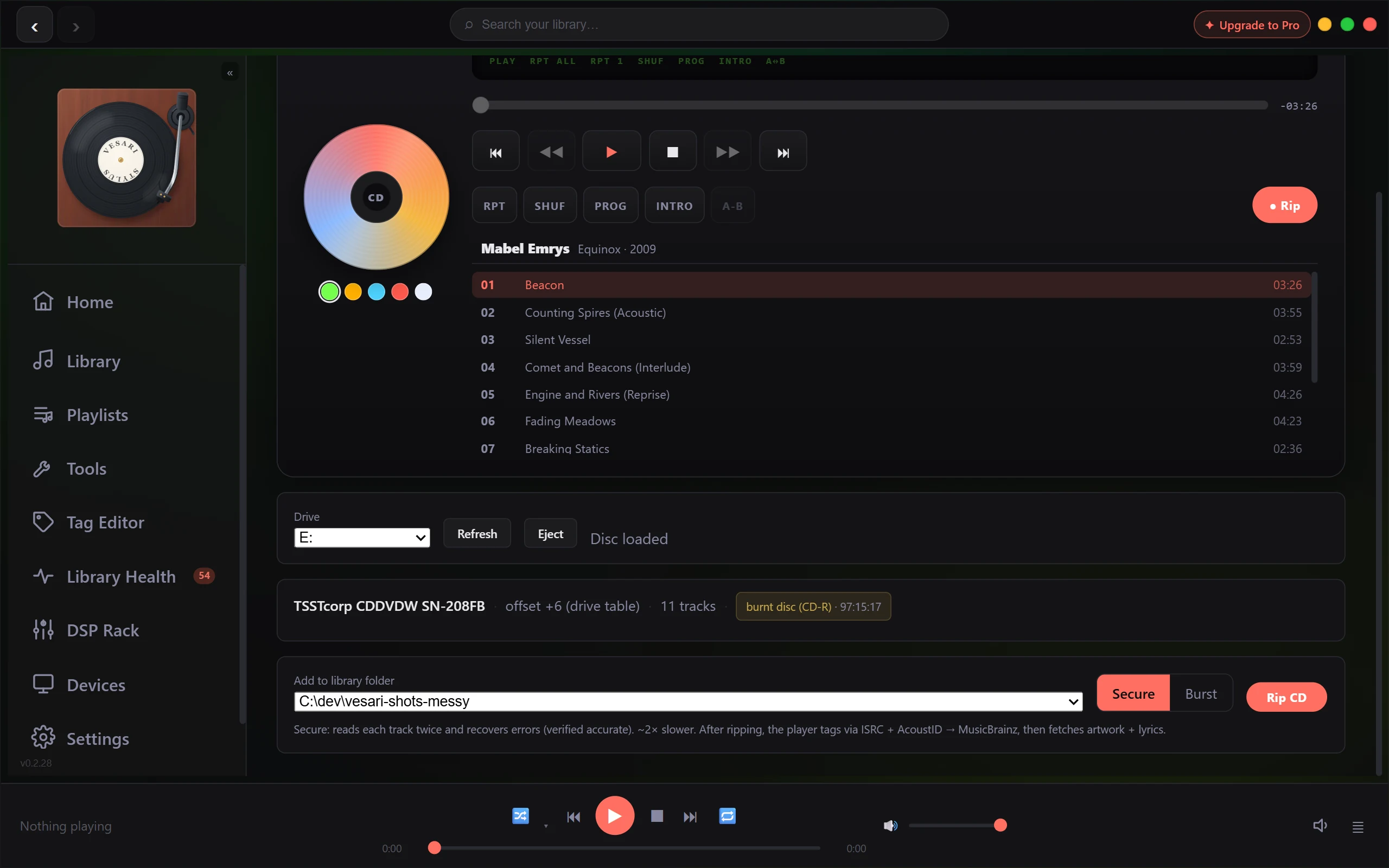
Choosing the drive
The Drive picker lists every optical drive Windows currently reports. It keeps your current pick when that drive is still present, otherwise the first in the list. Refresh re-reads the list, Eject opens the tray, and if nothing is found the page says No optical drive detected and keeps looking, so a drive plugged in later turns up on its own.
Nothing starts a read. RipCore watches the selected drive like a CD deck, and the status line beside the buttons moves from Watching for a disc... through Identifying disc... to Disc loaded as the tray settles. A fault instead shows Drive problem with the drive's own words; see When a disc is not identified.
Under the player, a line reports the drive model, read offset, audio track count, and, when the drive can tell, whether the disc looks burnt or factory pressed. The offset comes from a built-in table of drive models, shown with its source, for example offset +6 (drive table); a drive missing from that table reads uncalibrated, at zero. There is nowhere to type one, so that line is a readout, not a setting.
Eject is refused while a rip runs, and so is CD playback. Press Stop first; two things reading one disc at once turns a clean rip into a storm of re-reads. If you have ripped this exact disc before, a line says so, with the album and the date.
Secure or Burst
The Secure / Burst switch sits next to the folder picker, and it is the only quality decision you make.
| Secure | Burst | |
|---|---|---|
| Reads per section | Two that agree, over up to ten passes | One |
| Recovery | Up to 48 targeted re-reads | None |
| Time | Roughly twice as long | As fast as the drive goes |
| Result headline | reads Ripped 10/10 accurate |
reads Ripped 10 tracks (burst) |
| Confidence from | The engine, plus the community cross-check | The cross-check alone |
Both modes apply the same read offset and leave a rip log beside the files, but the logs differ. A Secure log is headed Secure (2-pass, consensus-verified); a Burst log is headed Burst (1-pass, unverified) and says plainly that it is not consensus-verified. Reading the rip log & the "unverified" badge goes through both.
The CueTools lookup runs when the disc is first read, before you pick a mode, which is why its result is already on screen.
Secure is the default, and the right answer for anything you would hate to do twice; Burst suits a disc in good condition the database already recognises. The switch resets to Secure every time you start the app.
Where the files land
Add to library folder chooses which of your library folders receives the album. Only library folders are offered; anything outside is refused before the drive reads a sector, since such a rip would be indexed and then refuse to play. On a first run, with no library folder yet, the panel offers Choose your music folder... instead.
Inside the folder you pick, RipCore makes a Ripped subfolder, and inside that a folder named from the disc's own identifier rather than from the album. That short fingerprint is stable and exists before the album is identified, so re-ripping lands in the same place rather than scattering copies. The same filenames are written again, so a re-rip replaces what was there. The library shows the tags, not the folder name.
The folder ends up holding:
- One FLAC per track, named
01 - Title.flac, taking the title from CD-Text when the disc carries one and falling back toTrack 01when it does not. A track the drive could not read is marked failed and gets no file. cover.jpg, when the disc is an enhanced CD carrying artwork, or.png/.gif, following the image.rip-log.txt, orrip-log.partial.txtif you stopped the rip.
A rip where every track failed to read, or one you stop before the first track finishes, leaves nothing: the empty folder is removed and no log is written.
There is one format, so there is no format menu. Tracks are FLAC at the disc's own 16-bit, 44.1 kHz stereo, at the everyday compression default rather than the slowest setting. FLAC is lossless at every level, so the decoded audio is the same either way. Only minimal tags go in at write time: track number, ISRC, and the CD-Text title. The pass that runs straight afterwards writes the real album, artist, artwork and lyrics, and Rip a CD to your library covers it.
Your chosen folder is remembered across restarts. The drive and the Secure or Burst choice are not.
The free allowance
A free licence gets five discs, a trial gets twenty, and Pro and Lifetime are uncapped. The count is per disc, not per track, and it is spent only once the rip has landed in your library. A rip that fails, or one stopped before the first track finishes, costs nothing; stop after some tracks saved and it does spend one, since those tracks are yours to keep.
Ripping itself is the same at every tier. The tagging pass afterwards is not: it draws on its own free budget, so a free licence that has spent it keeps the rip and its rip-time tags and stops there. See What the free allowance covers, and how it is counted.
If something here behaves differently, see Is this a bug? How to report it.