Help / Playback & output
Bit-Perfect mode: the bypass switch, and the badge it is not
Two things in Vesari Stylus carry the words bit-perfect, and they answer different questions. One is a switch you flick. The other is a readout the app fills in after music has played. Telling them apart is most of the story.
The short answer
Bit-perfect mode is a request. Switch it on and the engine stops processing your audio: the Equalizer, the Parametric EQ, Crossfeed, ReplayGain and the volume control all stop touching the samples.
The bit-perfect readout is a report. It describes the stream that just played, and comes from the audio engine, not your settings.
Turning the switch on does not make the readout say yes. The two can disagree, and the app says so rather than rounding up.
What the switch does
It sits in two places, one setting:
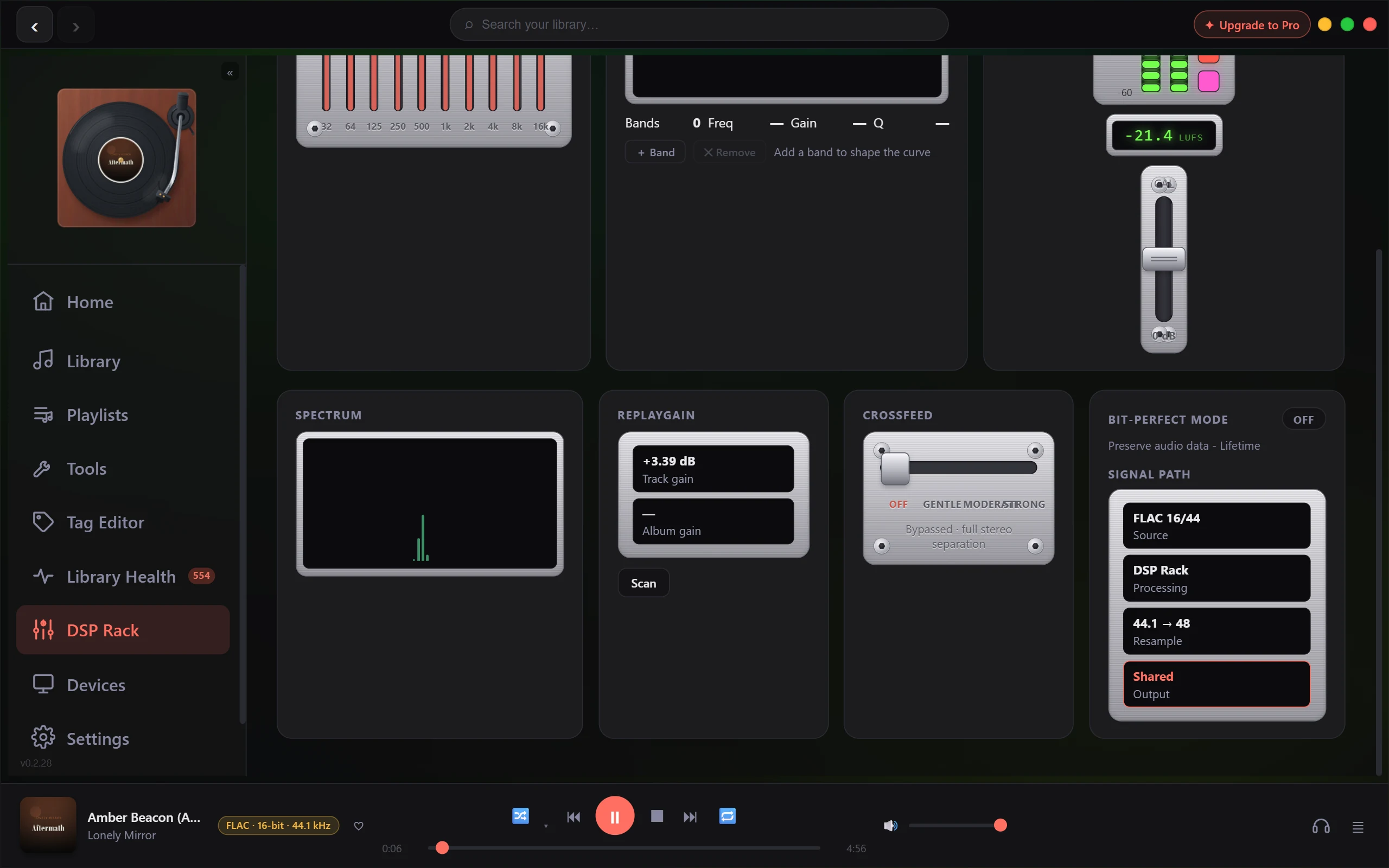
- DSP Rack, in the rightmost panel of the bottom row, headed Bit-perfect mode and described there as Preserve audio data.
- Settings, on the Playback tab, under Audio Output, as Bit-Perfect mode.
While it is on, the engine holds the chain neutral. Your Equalizer curve, Parametric EQ bands, Crossfeed and ReplayGain stop being applied, and volume is forced to unity: the slider goes inactive and pins to 100%. None of it is erased. Your curve, bands, crossfeed strength and stored volume level survive untouched, and the engine restores them when the mode goes off.
The app shows the bypass rather than hiding it. The Equalizer, Parametric EQ and Crossfeed panels dim, their controls stop responding, and each picks up a small Bypassed tag. ReplayGain is handled differently on purpose: only its readout dims and only its header is tagged, because Scan writes tags into your files and still works. An At unity pill appears beside the volume slider.
What the switch does not do
It does not change your output device, your output mode, or the rate your device runs at. The resampler and the output stage sit outside the processing chain, so the bypass says nothing about them. In Shared output your music still passes through the Windows audio engine, and a rate mismatch is still converted on the way out.
So the mode can be armed on a path that cannot carry an untouched stream, and the app leaves it armed rather than quietly switching your processing back on.
The readout is a separate answer
Open the Devices page and look at Device Details. The Bit-perfect row there is a readout, never a control: YES, NO, or a dash while nothing has played yet.
For YES, the engine has to see all of this on the stream that ran:
- It played on the WASAPI Exclusive path.
- Nothing in the processing chain touched the samples.
- No sample rate conversion: the device was open at the file's own rate.
- No channel downmix.
- The output stage carried the file's bit depth, with no dither or truncation.
Miss any one and the row reads NO. Shared output cannot reach YES at any setting, because the Windows audio engine sits in the middle and the app will not speak for a path it cannot see. ASIO is not in this build at all; see ASIO is greyed out in the output list.
Read NO carefully. It does not mean something is definitely mangling your music. It also covers "the app cannot follow this path far enough to say". The same limit sits at the far end: what your DAC does past the driver is beyond any player's reach.
Seeing both at once
The Signal Path button sits between the now playing panel and the transport controls. It expands a stage by stage breakdown ending in a verdict line. Processed means the chain is doing something. DSP bypassed · output not verified shows when the switch is on but the stream missed one of the conditions above. The third reads Bit-perfect, and appears only when the stream met them all.
The smaller labels follow the same rule. A bypassed panel reads Bypassed alone, and Bypassed · Bit-Perfect only when the stream's verdict agrees. The volume pill reads At unity, or At unity · Bit-Perfect on the same condition.
Practical notes
- The mode carries the same entitlement as WASAPI Exclusive output: a Lifetime feature, also included in the 30-day trial. On Free and Pro the switch reads off, and clicking it opens the upgrade prompt instead of arming anything.
- On Shared output a mid track toggle reaches the audio almost at once. A running WASAPI Exclusive stream captured the mode when it started, so there it lands at the next track or seek. The controls update straight away either way.
- Playback never stops, pauses or degrades because of any of this, on any tier.
The app reports per stream rather than lighting a badge off a setting, so a NO beside an armed switch is information, not a fault.
If the switch is on and the readout still reads NO, why the bit-perfect readout says no covers the usual causes. If you think the app has it wrong, see Is this a bug? How to report it.
Related: The signal path & the bit-perfect badge · Choosing an output mode: Shared, Exclusive & ASIO · What is in the DSP Rack.