Help / Troubleshooting
The issue counts disagree, or do not go down after I fix things
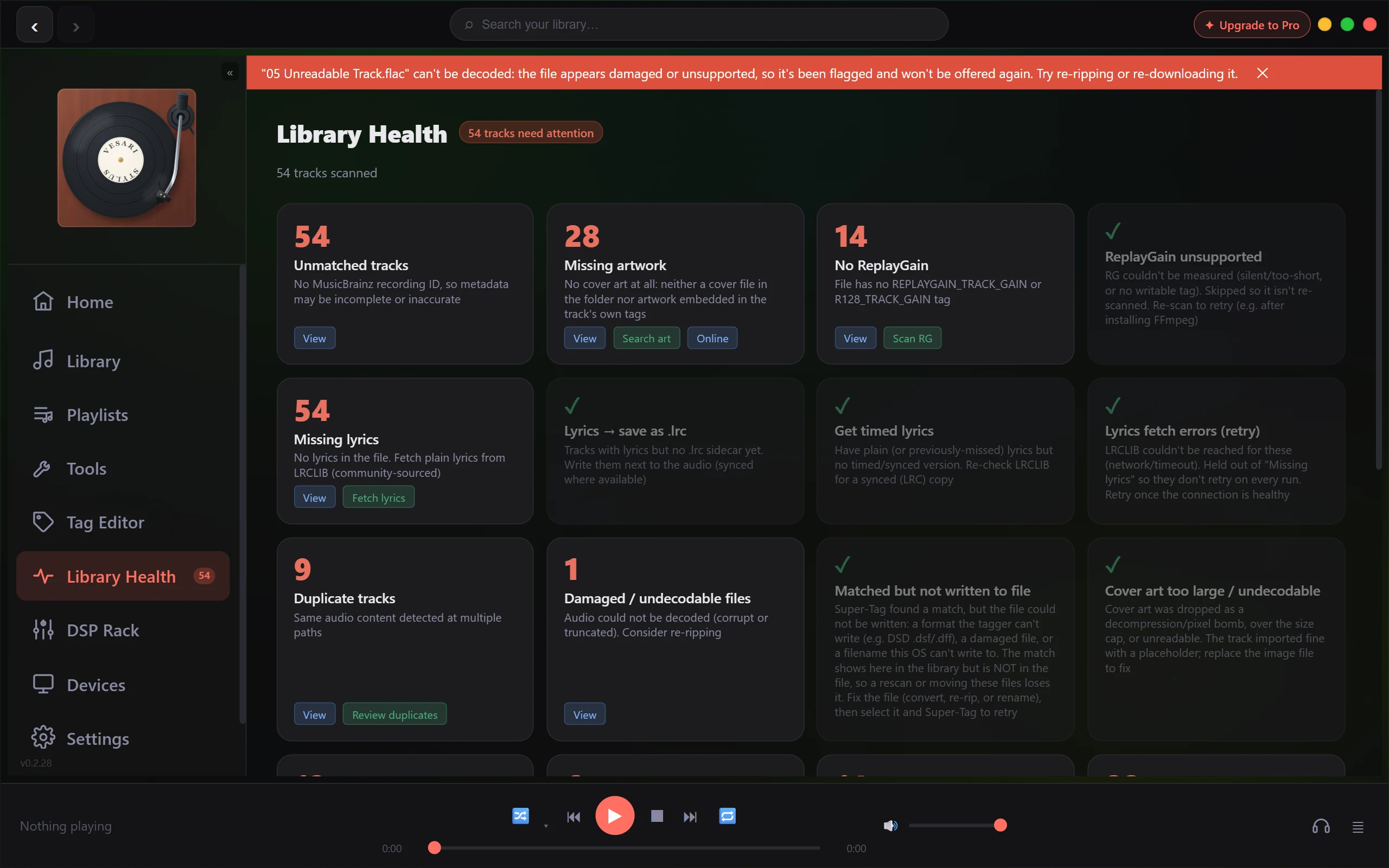
Library Health puts numbers on screen in several shapes at once, and they are not meant to add up. Several cards can show the same large figure on a new library, and a fix you just applied can leave a count sitting exactly where it was. None of that is a fault. Each number answers a different question.
The short answer
Each card counts tracks that fail one test, so a single untagged file is counted by several cards at once. The badge in the header counts each track once, however many cards it trips, so it is not the sum of the cards and never will be. Both are measured against your whole library, including the extra copies and undecodable files the normal views keep out of sight. Read the cards as a menu, not a bill.
One number, four places
Four surfaces show the same figure, the count of distinct tracks with at least one issue you can act on: the Library Health badge on the sidebar, the Library Health tile on Home, the Library Health card on Tools, and N tracks need attention in the Library Health header. They are computed the same way, so they agree. The one exception is timing: the header and the cards read a copy of the library that lags about half a second behind, so while a job is running they can trail the other three briefly.
The sidebar badge is display capped. Past 999 it reads 999+, and hovering it shows the true figure.
Under the header sits N tracks scanned. That is your full library size, and the badge can never exceed it.
Why the scanned total is bigger than your track list
The Tracks list quietly holds back three kinds of row: extra copies flagged as duplicates, files that would not decode, and the physical file behind a CUE sheet whose contents are already listed as separate tracks. Library Health holds back none of them, because they are part of what it exists to find. So N tracks scanned is normally higher than the N tracks counter beside the search box, and Home's Tracks figure matches Library Health rather than the list.
The bar reading "N duplicates + M damaged hidden" accounts for two of those three; the CUE containers are simply never shown on a listening view. Why do I see two different "duplicate" numbers? covers the duplicate half.
A file that has never been through a tagger genuinely has no MusicBrainz IDs, no measured loudness, no year and no cover: one track failing several tests, not one problem counted several times. That is why a fresh library lights up across the board. Every Library Health category, explained says what each card measures.
Why a fix did not move the number
- That card is not in the badge. Eleven of the twenty-one cards are left out of the header count. Some are findings rather than chores, some have a remedy that is not tag editing, and several still keep a working button. The categories article marks which is which.
- The track still fails another test. The badge only releases a track once it has no actionable issue left. Fetching its lyrics will not release a file that still has no year.
- The run stopped at your free allowance. A ReplayGain scan that runs out of budget measures what it can and says so, ending with something like "N left unmeasured (free scan budget)". The count falls by the part that ran. See What the free allowance covers, and how it is counted.
- The count moved sideways. When loudness cannot be measured for a file at all, it is marked so it is not retried forever: it leaves No ReplayGain and appears under ReplayGain unsupported. The badge drops, because only the first of those two feeds it, while the cards taken together barely move.
- You changed the files outside Vesari Stylus. The cards read the library database, not the files on disk. Run Rescan Library on Tools and the database catches up.
- The app has only just started. Missing artwork counts a track as missing until the embedded art check has reached its row, because briefly over-reporting is more honest than hiding art-less tracks. It settles as that pass works through the library, and any file it could not open is left for a later launch.
- A job is still running. The counts lag the live library by about half a second, so they trail the progress bar.
When View lists fewer tracks than the card claimed
View filters the library by the card's own test, and during a drill-in the hidden duplicates, undecodable files and CUE containers are all shown rather than filtered out, so the list should match the number. One thing still narrows it: text left in the search box, which pressing View does not clear. Clear the search and the list fills back in on its own.
While a drill-in is active, the bar above the list reads Filtered: with the category it is showing, alongside a ✕ Clear button and a ← Library Health button back to the page.
A dash instead of a tick
Two cards cannot judge a file without opening it, so where the others would show a green tick they show a dash and how many are not scanned yet. They keep their buttons, because a tick drawn from a sample of nothing would be a false all clear.
If a number is genuinely impossible
If a count exceeds your library size, if those four surfaces still disagree once everything has settled, or if View lists a plainly different set from the card's figure, use Report a Bug on the Support tab in Settings and name the card. Is this a bug? How to report it explains what that sends, and reading the application log shows where to look first.