Help / Playback & output
Output meters - VFD, VU, PPM & LUFS
DSP Rack → Output panel. Several ways to see how loud the music is. They're display only - reading them never changes the sound (they tap the output after all processing, purely to show it).
At a glance
| Readout | Measures | Scale | "0" means | Best for |
|---|---|---|---|---|
| VFD (segmented LEDs) | Peak level | −60 … 0 dBFS | digital full scale (clipping ceiling) | headroom - how close you are to clipping |
| VU (analogue needle) | Average loudness (RMS) | −20 … +3 VU | the reference level (−14 dBFS) | how loud it feels, moment to moment |
| PPM (analogue needle) | Peak level | −12 … +9 (over alignment) | the alignment level (−9 dBFS) | broadcast-style peaks with a slow, readable fall-back |
| LUFS (digital number) | Perceptual loudness | LUFS (negative) | - | a precise, standards-based loudness figure |
Rule of thumb: VU and LUFS broadly agree on "how loud," while the VFD and PPM show peaks/headroom. If the VU needle sits near 0 but a peak meter is hitting the red, you've got a dynamic track (big peaks over a moderate average) - exactly what you want for good sound.
The readouts
VFD - peak level (dBFS)
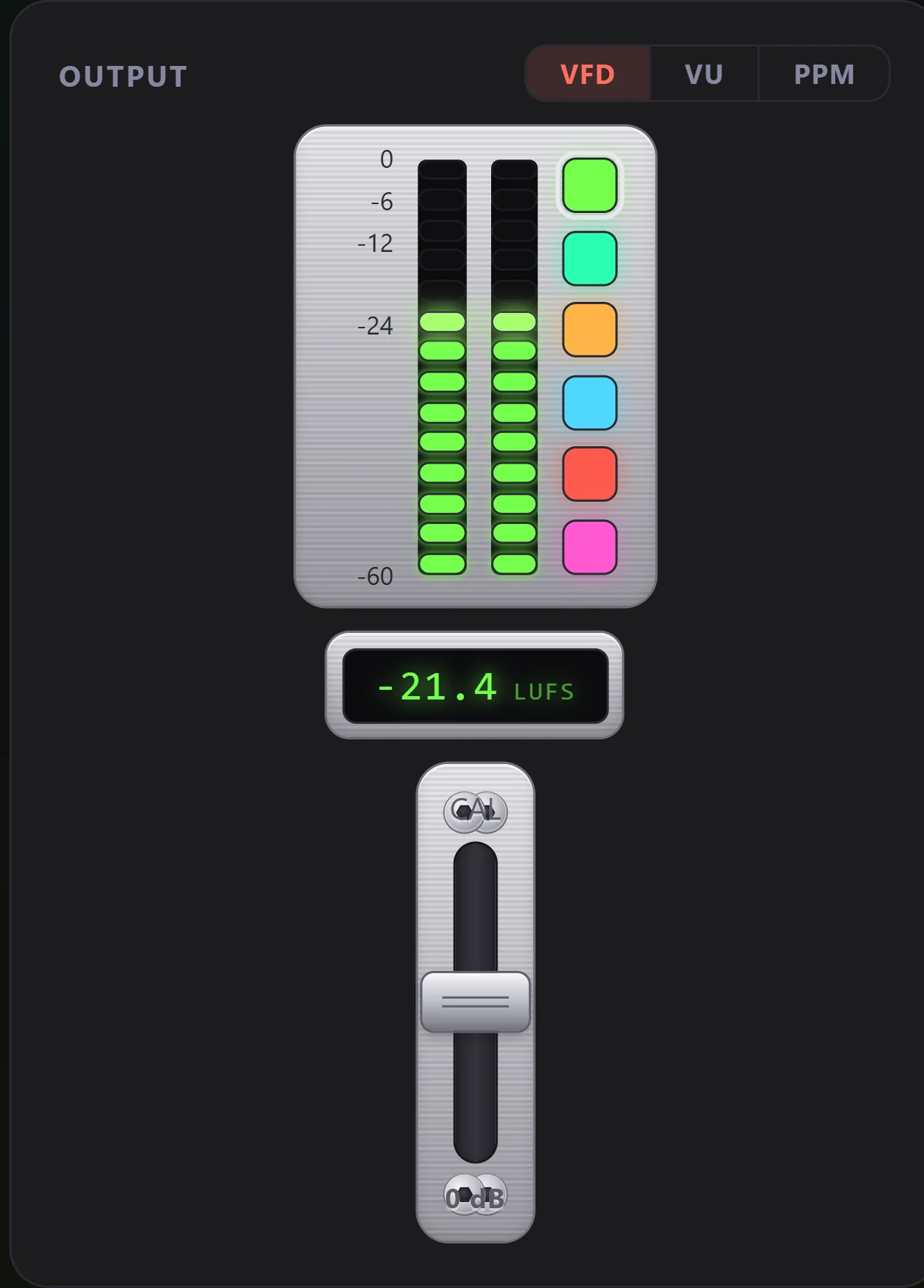
The segmented bars are a digital peak meter. Each channel climbs a −60 … 0 dBFS scale, where 0 dBFS is the absolute ceiling - the loudest a digital signal can be before it clips. The brightest lit segment is the current peak; the top band (≥ −6 dBFS) glows red as a "getting hot / near clipping" warning.
Use it for headroom: well-mastered music peaks below 0 dBFS and only flickers into the red on transients. Pinned in the red = the signal is at the ceiling.
You can re-skin the VFD: a column of colour swatches beside the bars sets the phosphor colour (amp-green, VFD green, amber, ice-blue, ember-red, magenta), and your pick is remembered between launches. The red over-zone stays red regardless.
The VFD has its own CAL fader (below the LUFS readout) - a reference trim. Where the VU's CAL moves the 0 VU point, the VFD's CAL shifts the whole displayed scale by up to ±12 dB (drag the cap, click the slot, or arrow-key; default 0 = true dBFS, remembered between launches). Push it up to add headroom - pulling a hot, brick-walled master off the top so you can read its movement instead of a pinned bar; down to lift a quiet, dynamic recording onto the scale. This is deliberately the same gesture as the VU's CAL: on either meter, push up to tame a loud master.
It stays honest two ways:
- The dB labels move with the trim. The numbers beside the bars always state the true level at that height, so the meter never lies about what you're seeing - at 0 it reads −60 … 0 dBFS as normal; trim it and the labels slide to match.
- The overload pip is independent of the trim. A dedicated segment at the very top still lights on a real peak (≥ −0.5 dBFS) however far you've trimmed the display - so the CAL can move the bar down for readability but can never hide actual clipping.
VU - average loudness (the analogue needle)
The needle meter is a classic VU (Volume Unit) meter. Where the VFD reacts to instantaneous peaks, the VU tracks average loudness with fast-attack / slow-release ballistics - it snaps up on the beat and falls back smoothly, following how loud the music feels rather than its sharpest peaks. The red arc past 0 VU marks the hot zone.
0 VU is calibrated to −14 dBFS - the streaming-loudness reference, chosen so modern (loud) masters sit on the scale rather than pinned against the stop. So when the music's average level is −14 dBFS, the needle rests on 0 VU. A typical track hovers around or just below 0 VU, with peaks pushing the VFD higher. (A stricter −18 dBFS/EBU broadcast reference pins most loud masters, which is why the hotter −14 is the better default for music. Use the CAL fader below the meters to move where 0 VU sits - drag it, click the slot, or arrow-key it; hotter, toward 0, for louder material - exactly like the CAL control on classic hardware.)
PPM - peak programme (the broadcast needle)
The PPM (Peak Programme Meter) is the analogue answer to the VFD: a needle, but reading peaks instead of average. It's the broadcast-standard meter (BBC, EBU, DIN), and its signature is the ballistics - a fast attack that catches transients and a slow, deliberate fall-back so you can actually read the peak before it drops. Where the VU bounces with the groove, the PPM jumps up and eases back down.
The scale is marked in dB over an alignment level, with 0 dBFS (digital clip) at the very top (+9). The CAL fader sets which dBFS peak reads "0" - default −9 dBFS, chosen so music peaks ride the upper scale rather than shooting off it; push it up to tame a hot master, exactly like the VU. It reads the same sample-peak as the VFD, so think of it as the VFD's peak information on an analogue face - giving you a true all-needle (VU + PPM) period setup: average on one, peak on the other.
LUFS - perceptual loudness (the digital readout)
The number under the meters is momentary LUFS (Loudness Units relative to Full Scale), measured to the broadcast standard ITU-R BS.1770 with K-weighting over a ~400 ms window. It's the most accurate "how loud does this sound" figure of them all, in proper, comparable units.
For reference: streaming services normalise to roughly −14 LUFS; broadcast targets −23 LUFS (EBU R128); aggressively "loudness-war" masters sit around −9 to −6 LUFS. See ReplayGain for how the app uses loudness to level-match playback.
How they work together
- VFD = peaks / headroom. Are you near the 0 dBFS ceiling?
- PPM = peaks, analogue. The same peak story as the VFD, on a needle with a slow, readable fall-back.
- VU = feel. How loud is it, smoothed like the ear hears it?
- LUFS = the number. A precise, standards-based loudness value you can compare between tracks.
Reading them together tells you the dynamics: a big gap between the peaks (VFD/PPM) and the average (VU/LUFS) means a dynamic, breathing master; little gap means a compressed, "always loud" one.
Switching meter style
The VFD / VU / PPM toggle in the Output panel header flips between the segmented LED meter, the analogue average (VU) needle and the analogue peak (PPM) needle. Your choice - and the VFD colour and each meter's CAL - is saved, so the panel comes back the way you left it. For the period-correct all-analogue look, pair them in your head as VU + PPM (average + peak); or stay on the VFD for the one-display 80s deck vibe.
Technical notes & limitations
- Independent L/R. The two VFD columns / VU + PPM needles read genuinely separate left and right channels off the post-DSP output, so channel balance, a mono-fold, or an asymmetric master are visible at a glance. (Crossfeed deliberately blends L↔R, so with it on the two meters pull together - that's the meter showing the processing, not a fault.) The single LUFS figure stays one number - a proper stereo BS.1770 sum (both channels K-weighted and summed), which is the correct way to read loudness.
- Front L/R on surround. On a >2-channel device the meters show the front left/right pair; a full surround downmix is a later addition.
- Momentary, not integrated. The LUFS figure is momentary (a live ~400 ms reading), not an integrated whole-track loudness. It moves with the music; it isn't the single "this album is −14 LUFS" number a mastering tool reports.
- Not a mastering meter. These are listening meters for an audiophile player - accurate and calibrated, but not a substitute for a certified studio meter.
- Post-DSP. Levels reflect what you actually hear - after EQ, ReplayGain, crossfeed and volume. So ReplayGain pulls hot masters down and keeps the meters in a usable range across tracks. With every stage in the rack switched off the rack changes nothing, so the meters follow the source level rather than your processing.
FAQ
Why doesn't the VFD sit at 0 dB? 0 dBFS is the clipping ceiling, not a target. Music should peak below it; living in the red means the signal is slammed against the limit.
Why do the left and right meters sometimes show the same thing? They're independent now - equal levels just mean the material is centred (mono or a balanced mix), so both channels genuinely carry the same level. Pan something hard, play an asymmetric master, or watch a mono track and you'll see them diverge. (Turning Crossfeed on also pulls them together by design - it blends L into R and vice-versa.)
I muted one channel but still hear a faint sound in the other ear - yet its meter reads dead. Why? Because the meter is right: the app is outputting digital silence on that channel. The faint sound leaks in after the audio leaves the software - analog crosstalk in your DAC/amp/cable/headphones, which no software setting can change. It's normal and harmless. The meter showing silence while you faintly hear it is the proof. Full explanation: Channel separation & crosstalk.
VU or LUFS - which should I trust for loudness? Both measure average/perceived loudness and should broadly agree. LUFS is the precise number; the VU is the at-a-glance feel. The VFD and PPM are the odd ones out - they're about peaks/headroom, not loudness.
VU or PPM - what's the difference? Both are analogue needles, but they read different things: the VU shows average loudness (how loud it feels), the PPM shows peaks (how close transients get to clipping) with a fast-attack / slow-fall response. VU is the classic hi-fi/console meter; PPM is the broadcast meter. Side by side they're the authentic all-analogue pair - one for level, one for peaks.
What level should I aim for? For listening you don't need to "aim" - these are for insight, not adjustment. As a guide, a healthy track averages around or just below 0 VU (≈ −14 dBFS) with peaks comfortably under 0 dBFS on the VFD.
Why does a really loud track still pin the needle (even at −14)? Because the master itself is that loud. A track reading around −10 LUFS is brick-walled - mastered with almost no headroom - so its average sits well above the reference and rides the top. That's the meter being honest, not broken. Two things bring it back on-scale: turn on ReplayGain (the meters read the output, so loudness-normalised playback pulls hot masters down toward the target and every track lands in a usable range), or push the CAL fader toward 0 (e.g. −10) so that louder level reads as 0 VU. A pinned needle is itself information - it means the master is slammed.
The VFD has a CAL fader too - is it the same as the VU's? Same idea (a calibration trim), different job - but they move the same way: up to tame a loud master on both. The VU CAL moves where 0 VU sits on the dial (a dBFS reference, −24 … −6). The VFD CAL is a display trim (±12 dB) that slides the whole peak scale so a pinned master reads lower - and because the dB labels move with it, the readout stays true. Either way, the VFD's top overload pip ignores the trim and still flags a real ≥ −0.5 dBFS peak, so you can't accidentally calibrate clipping out of sight.
Does the meter change the sound? No. It's a read-only tap on the output for display; it adds nothing to the signal path. The CAL faders only re-scale the display - they don't touch the audio.